google-site-verification: googledf40e7617e1dc255.html TECH KNOWLEDGE

Labels

Friday, May 15, 2020

How to Install Super Wallpapers from MIUI 12 on Any Android Device

                                  MIUI 12 Super Wallpaper 


By..(Beebom)

Recently, Xiaomi announced MIUI 12 in China and brought a laundry list of features with the new iteration of MIUI. Among them, Super Wallpapers stood out as one of the best feature of miui 12. It’s basically live wallpapers of Earth and Mars, but with more dramatic animation. 


Install Super Wallpapers from MIUI 12 on Any Android Device

The procedure to install MIUI 12’s Super Wallpapers is straightforward, thanks to linuxct of XDA Developers who ported the live wallpapers from MIUI 12 for all Android devices.Having said all of that, let’s now go through the steps.


1. First of all, download the Super Wallpapers ZIP file from here . After that, extract the ZIP file on your Android device.

2. Next, install all four Super Wallpapers APKs one by one.

3. After that, install the Wallpapers app by Google (Free). It will allow you to access Super Wallpapers on your device.


4. Now open the Wallpapers app by Google and scroll down to the bottom. Here, you will find “Live wallpapers”. Open it and you will find all the Super Wallpapers from MIUI 12. Now, select the wallpaper of your choice and tap on “Set Wallpaper”. You are done.

5. On some Xiaomi devices, the Wallpapers app doesn’t show the “Open” button, making it harder for users to access the Super Wallpapers. In that case, you will need to install Activity Launcher (Free) to trigger the Wallpapers app.
6. After the installation, open Activity Launcher and search for “Wallpapers”. Now, expand the “Wallpapers” menu and tap on the first option. It should take you directly to the Wallpapers app and from there you can easily access and set Super Wallpapers on your Android device.


7. In case, the first option does not work then try the other options. Apart from that, if you want to quickly access Super Wallpapers then you can create a shortcut as well. Tap and hold on the option and select “Create shortcut”. This will make a shortcut on your home screen.


Enjoy MIUI 12’s Earth and Mars Live Wallpapers on Your Android Device


Apps For stock android ( Top 10)

                              Top 10 Apps for Stock Android.

You must Download on Stock Android Phone first.

Applications:-

 1. Screen Recorder (Ads free)

Main Feature:

+ Support save a video in SD Card or anything location which you         want.
+ Record screen
+ Take screenshot
+ Support facecam (both front and back) while recording. You can         double-tap the preview to change.
+ Support Magic Button help stop, pause and show recording time         (for Simple Magic button)
+ Edit overlay feature - you can draw notes onto the screen while recording.
+ Trim video after finish recording or any video has format MP4 available on devices
+ Record sound of MIC when record screen video
+ Insert logo text, logo image
+ Support Day/Night theme
+ Support quick tiles (shortcuts for the notification panel) for Android 7.0 and greater
+ Internal sound for games from Android Q - Android 10.


NOTE: If you are using XIAOMI device, please do the following:
You must go to security ->choose permission -> permission -> Screen Recorder and turn on pop up window. Follow up, you go to security -> Permission -> AutoStart -> turn on Screen Recorder.
Press recently app button and
 look at Screen Recorder, if Recorder hasn't locked (lock icon over Screen Recorder), please pull down it -> OK


2. Voice Recoder

Main Feature:

- Supported formats: MP3, AAC (M4A), Wave
- Android Wear support
- Smooth playback
- Wifi voice memos transferring
- Display content from Google Drive
- Export to and import from Google Drive and DropBox
- HD Bluetooth recording
- Android App Shortcuts support
- Support stereo recording
- Recording in background
- Integration with widget
- Silence skip, gain reduction, echo canceler


3.NetSpeed Indicator ( Ads Free)

Main Feature:

• Real-time internet speed in status bar
• Track and monitor daily data and WiFi usage from notification
• Hide when not connected to any network
• Unobtrusive notification to let you focus on what's important
• Highly customizable
• Battery and memory efficient
• No ads, No bloat


4.Junk Cleaner (BY GOOGLE)


While taking very little storage on your device, Files does three things in one:

1) Free up space - Clean junk files and cache, boost your mobile phone or tablet as you clean up the phone memory and optimize your smartphone performance.
2) Find files fast - Browse your storage and find everything fast without being expert in file management.
3) Share files - Send pictures, share videos, transfer large files or app apks. All of this with super fast speed with rate up to 480 Mbps over an encrypted direct wifi network.


5.Black Player (Ads Free)


Main Feature:

★ Supports standard local music player files such as MP3, WAV, OGG, FLAC, M4A 🎵
★ 5 Band Equalizer, BassBoost, 3D Surround Virtualizer and Amplifier. You can also use your external Equalizer for best audio quality
★ Gapless audio playback.
★ View & Edit embedded lyrics, supports synchronized .lrc files.
★ HD Album cover management, auto and manual.
★ ID3 Tag editor, edit Tracks, Albums, Artists & Genres
★ Customizable Themes, fonts, colors and animations
★ Supports Android Auto and Wear OS (previously Android Wear)
★ Supports mp3 scrobbling.
★ 3 widgets.
★ Sleep timer (activate in Interface Settings)
★ Crossfading


6.Mx Player (Ads Free)


Download with my link for Ads free interface


7.GO Gallery (By Google)


AUTOMATIC ORGANIZATION

Each night, Gallery Go will automatically organize your photos to group by: People, Selfies, Nature, Animals, Documents, Videos and Movies.
Gallery Go helps you stay organized, so you can spend less time scrolling for that photo of your friend or family member, and more time sharing memories with them.*

AUTO-ENHANCE

Gallery Go has easy to use photo editing tools, such as auto-enhance which will make your photos look their best with one-tap.

FOLDERS AND SD CARD SUPPORT

Use folders to organize photos in any way you want. All while still being able to view, copy and transfer to and from SD Cards, easily.

PERFORMANCE

Gallery Go comes in a small file size which means even more space for your own photos. All while using less memory on your device - so it won’t slow down your phone.

WORKS OFFLINE

Optimized to work offline, Gallery Go can easily manage and store all your photos and videos without using up all your data.
*face grouping not currently available in all countries


8.POCO Launcher (Ads Free)


Main Feature:

🏠 Minimalist design - Following in footsteps of Material Design, POCO Launcher puts all your apps in the App drawer, keeping the Home screen neat and clean.

🌟 Personalization - Resize the Home screen layout and app icons. Apply customized wallpapers, themes, and animations. Use third party icon packs to give your device a new look.

🔎 Convenient search - App suggestions, icon color categories, and lots of other customizable features allow you to find what you need much faster.

🎯 Manage apps - Group apps by category automatically or create custom groups to always keep important things just a tap away.

🔐 Privacy - Keep your apps private by hiding their icons.

🚀 Fast and smooth - POCO Launcher is optimized for breakneck speeds! Simple and fast, it works like a charm. Forget about slow system animations!


9. WPS Office


「 Highlights of WPS Office 」
Powerful Office Suite on your Android device
• Compatible with MS Office 365( Word, PowerPoint, Excel ), Google Docs, Google Sheets, Google Slides, Adobe PDF and OpenOffice.
• Integrate with Document, Spreadsheet, Presentation, and PDF

Scan, view, edit, convert PDF on your Android device
• Free PDF Reader, makes it possible to open, view, share and comment on PDFs anywhere and on any devices
• Free to convert all office docs ( word, text, Excel, PowerPoint, doc ) to PDFs
• Scan paper docs / turn images to PDFs
• Support PDF annotation
• Support PDF Signature, PDF Extract/Split, PDF Merge, PDF to Word/Excel/PPT
• Easily add and remove watermark in PDFs

Over 30 practical functions for WPS premium members
• Share bookmarks for documents
• File reduce, extract and merge
• Remove ads
• Turn picture to Doc, Sheets, and PPT
• File recovery and file repair
• Change the reading background

Create PowerPoint on your Android Device
• Dozens of layouts, animation, and transition effects
• Create PowerPoint using WIFI, NFC, DLNA, and Miracast
• Touch controlled laser pointer, Ink feature lets you draw on slides while in presentation mode

Powerful sheets & Forms on your Android device
• Predefined formulas make you do basic data and digital operation more conveniently
• Create a questionnaire of different themes freely

Support Google Drive on your Android device
• Automatically save docs to the clouds: Dropbox, Google Drive, Box, Evernote, and OneDrive.
• Easily access and edit office documents directly

A solution for working remotely on your Android device
• 1G free cloud storage, support online editing and sharing files, easy to built and join the Cloud Team
• Easy to share office documents via WIFI, NFC, DLNA, Email, Instant Messaging, WhatsApp, Telegram, Facebook and Twitter

Supports 51 languages and All Office File Formats on WPS Office
• File Formats: doc, docx, wpt, dotm, docm, dot, dotx / xls, xlsx, xlt, xltx, csv, xml , et, ett / PDF / ppt, pot, dps, dpt, pptx, potx, ppsx / txt / log, lrc, c, cpp, h, asm, s, java, asp, bat, bas, prg, cmd, Zip

Various of Value-added in-app Products on WPS Office
• Exclusive authorized Fonts Package and Presentation Templates;
• Convert texts to fine images;


10.Unique Wallpaper-Wall X

— Simply Beautiful
An app that will make you fall in love with wallpapers. It's UI is designed to give a clutter-free experience by removing all the excess. Hassle free experience with a minimalistic interface and the negligible number of a relevant advertisement. All the wallpapers in the app are free to download.— Save battery and resources. (Features)The application displays only adapted to the size of your screen Wallpapers. This allows you to conserve battery power and Internet traffic, and use the app at maximum speed without losing image quality. The app works on dynamic loading algorithm which saves the data if few wallpapers are already present in the downloads section.— Creative wallpapersWall X is a high quality, selective collection 4k & HD wallpapers exclusively made by artists, for your device. Your phone and tablet have never been so good-looking.


Saturday, May 2, 2020

Oneplus Z

OnePlus Z is now rumored to pack the Snapdragon 765 chipset


The OnePlus Z is the missing link in the company's early 2020 roster, as it should be the model to try and alleviate the price hikes undergone with the launch of the OnePlus 8 and 8 Pro. Initially thought to be called OnePlus 8 Lite, the Z is still coming, only later. According to the latest mumblings on the matter, it should see the light of day in July.

Today a new rumor claims the OnePlus Z will be powered by Qualcomm's Snapdragon 765 chipset, and not the MediaTek Dimensity 1000L, as suggested countless times before.
On first blush this seems to just be a case of some leaksters getting things wrong, but there's an alternative explanation here. So bear with us as we go into unconfirmed speculation territory.

Thursday, April 23, 2020

NEW UPDATE OF PUBG MOBILE 0.18.0

PUBG MOBILE 0.18.0 UPDATE: RELEASE DATE,FEATURES AND MORE.


Pubg mobile next major update is expected to release on Aprile 24.The new Pung Mobile 0.18.0 update has been Miramar 2.0,safety scramble Mode and Jungle Adventure Guide Mode.
PUBG Mobile has been preparing the release of Erangel 2.0 but it has reportedly decided to release Miramar map 2.0 instead,\.The second version of yhe miramar map will come with visul changes like

  • Racing Ramp
  • Golden Mirado
  • Vending machine
  • Water city

Monday, April 20, 2020

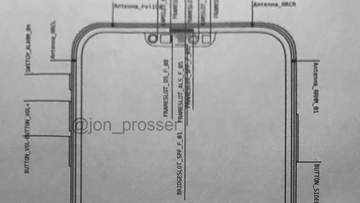
iPhone 12 to feature much smaller notch, without missing any Face ID sensors?


- Notch on the iPhone 12 much smaller

- All Face ID components still there

- Earpiece/speaker pushed up to the bezel


A leaked schematic drawing reveals that Apple's next iPhone could feature a much smaller notch, without reducing the number of sensors required to make Face ID work.
From looking at the imagery, it appears a big part of this is achieved through moving the earpiece/speaker up into the bezel of the phone, and squishing the other required sensors together.
That means there's still the infared camera, dot projector, flood illuminator, plus the proximity and ambient light sensors all in a space which is dramatically reduced from the notches used on iPhones since the iPhone X
The image was shared by Apple leaker, Jon Prosser on Twitter, and gives a good indication of what we can expect to see on the iPhone 12. 
https://twitter.com/jon_prosserView image on Twitter


Monday, April 13, 2020

Bring DMS and Lives to the Web

Instagram brings DMs and Lives to the web: How to find them


    They're easy to find and use on the web!

You no longer need the Instagram mobile app to access your DMs and Lives.
Instagram is rolling out two new features to the web version of its service: Your direct messaging inbox and Instagram Live. The two additions should help those of you who prefer to use laptops during downtime or perhaps constantly lose your phone and need your Instagram fix.

How to find your Instagram direct messages


It's almost surprising we haven’t been able to access our direct messages from a web browser, considering how long the service has been around at this point. Instagram said that the browser-based version of direct messages look and work much like they do on your phone.
  1. To access the Instagram inbox, go to the Instagram website and log in to your account.
  2. At the top right, you'll see the messaging icon in the menu bar.
  3. Click the messaging icon to access your inbox and messages.
Instagram direct messages are in the process of rolling out on the web, so you might not have access yet. 

Saturday, April 11, 2020

Stops Teachers Using Zoom App

Singapore Stops Teachers Using Zoom App After 'Very Serious Incidents'

One of the incidents involved obscene images appearing on screens and strange men making lewd comments.

Singapore Stops Teachers Using Zoom App After 'Very Serious Incidents'

Singapore has suspended the use of video-conferencing tool Zoom by teachers, its education ministry said on Friday, after "very serious incidents" occurred in the first week of a coronavirus lockdown that has seen schools move to home-based learning.
One of the incidents involved obscene images appearing on screens and strange men making lewd comments during the streaming of a geography lesson with teenage girls, according to local media reports.
Zoom Video Communications has been plagued with safety and privacy concerns about its conferencing app which has seen a surge in usage as offices and schools around the world shut to try curb coronavirus infections.
"These are very serious incidents. MOE (Ministry of Education) is currently investigating both breaches and will lodge a police report if warranted," said Aaron Loh of the ministry's educational technology division, without detailing the incidents.
"As a precautionary measure, our teachers will suspend their use of Zoom until these security issues are ironed out."
Loh said that they would further advise teachers on security protocols such as requiring secure log-ins and not sharing the meeting link beyond the students in the class.
Taiwan and Germany have already put restrictions on Zoom's use, while Alphabet's Google banned the desktop version of Zoom from corporate laptops on Wednesday. The company also faces a class-action lawsuit.
Concerns have grown over its lack of end-to-end encryption of meeting sessions, routing of traffic through China and "zoombombing" when uninvited guests crash meetings.
Officials at Berkeley High School in California said they suspended use of the app after a "naked adult male using racial slurs" intruded on what the school said was a password-protected meeting on Zoom, according to a letter to parents seen by Reuters.
To address security concerns, Zoom has embarked on a 90-day plan to bolster privacy and security issues, and has also tapped former Facebook security chief Alex Stamos as an adviser.
The Singapore government has also been using the tool to host media conferences.